Sheets Resume for Organizations
The AI resume builder for organizations.
Give your patrons, students and clients unlimited access to AI resumes, cover letters, interview practice and job search. Your staff stops building drafts and starts finishing them.
Your organization
Your people
2 active
Maria G.
ActiveDevon R.
ActivePriya S.
Paused
Built for the teams that help people get hired
- Public libraries
- Universities & career centers
- Shelters & housing programs
- Workforce development programs
- Nonprofits & job training
- Resumes created
- 633,981resumes created with Sheets
- Average review rating
- 4.88average from 395 reviews
- Helping job seekers since
- Since 2018helping job seekers, starting on Reddit
As featured in




The problem
One-on-one resume help doesn’t scale.
Career staff can only sit with a few people a day, and most of that time goes into typing and formatting a first draft. Sheets Resume handles the draft, so your time goes to the parts that need a person.
Without Sheets Resume
- Hours with each person, one at a time
- Staff types and formats every resume
- Help only during open hours, at one desk
- Two-column templates that trip up applicant tracking systems
- Everyone shares one login or one document
With Sheets Resume
- A strong first draft in minutes, for everyone at once
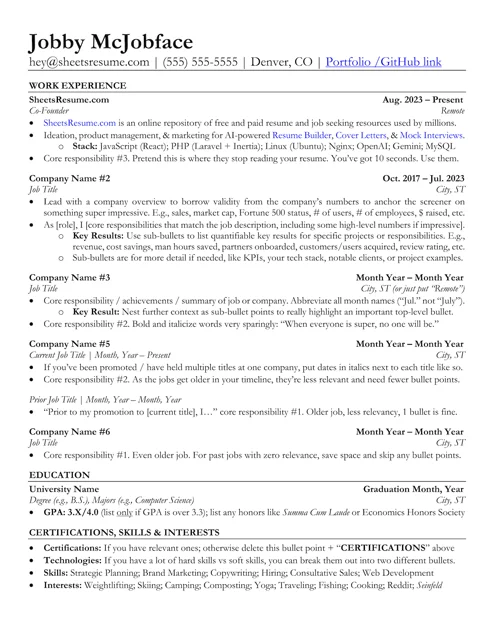
- AI builds the draft. Staff reviews and refines.
- Works from home, your building or a phone, any time
- A clean one-column format recruiters and ATS software read easily
- Every person gets a private account of their own
What’s included
Every tool a job seeker needs, in one account.
Everyone you add gets the complete paid version of Sheets Resume, with every tool included.
AI Resume Builder
Start from an old resume, a LinkedIn profile or a blank page. AI writes and polishes, and the format stays clean and recruiter-approved.
AI Cover Letter Generator
A tailored cover letter for every application, written from the person’s resume and the job description.
AI Interview Practice
Realistic practice interviews by voice or by typing, with feedback on every answer.
AI Job Search
Finds real openings matched to each person’s background and goals, with a tracker for every application.
AI Resume Analyzer
A score out of 100 with specific fixes, so people know what to improve before they apply.
AI LinkedIn Updater
Turns a finished resume into a LinkedIn headline, About section and experience entries.
Every download format
PDF, Word, Google Docs and more, ready to upload to any job application.
Works in Claude and ChatGPT
People who already use an AI assistant can tailor their Sheets resume to each posting right inside it.
How it works
Set up in minutes. No IT ticket required.
- 1
Tell us about your organization
Fill out a short form about who you serve and how you would like to roll it out. We follow up and set up your organization account with you.
- 2
Add your people
Type a name and an email. Each person gets an email to set a password, then signs in to a private account of their own.
- 3
Make room as people finish
Pause someone who landed the job to free their spot for the next person. Resume them any time, or remove the account.
For staff and admins
An admin screen built for staff, not IT.
One simple admin screen. No training, no spreadsheets of logins, no chasing passwords.
Add a person in seconds
Just a name and an email. The welcome email goes out on its own.
Only active people count
Paused accounts don’t count toward your plan. Pause anyone who is done and give their spot to someone new.
Private by design
Admins see names, emails and account status. Never anyone’s resume, letters or interview answers.
Full access for everyone
Each person gets the complete paid version of Sheets Resume for as long as your plan is active.
Your organization
Your people
3 active
Maria G.
ActivePauseDevon R.
ActivePausePriya S.
PausedResumeJames T.
ActivePause
Ways to roll it out
Set it up the way your organization works.
Individual accounts
Each person gets a login of their own and builds privately: at home, at your location or on a phone.
e.g. A public library giving patrons access
Shared computers
Running a computer lab or kiosk? Each visitor signs in to their own account and signs out when done, so no one sees the last person’s work.
e.g. A shelter or job center with shared computers
Custom-branded builder
Want the builder inside your own website? We offer a white-label version in your colors with no Sheets Resume branding, connected to the accounts your users already have.
e.g. A university with school-branded career tools
“Another patron saved from the evils of the two-column resume. He used the Sheets template and read the info on the site, and he already has calls since he updated yesterday. He was surprised, I was not. This is exactly why you developed this thing.”
Ranked #4 of the 10 Best Resume Builders for 2026 by Forbes Advisor.
Named the #1 overall resume builder of 2026 by Tech Times.
Recommended to students by Fresno State’s Career Development Center.
Get started
A plan built around the people you serve.
Every organization is different, so we set up each plan with you. Tell us who you serve and how you would like to roll it out, and we will put together the right fit.
Every plan includes
- Every Sheets Resume tool for everyone you add
- An admin screen to add, pause and remove people
- Private accounts: staff never see resumes
- Individual accounts or shared computers
What happens next
- 1
Fill out a short form
Your organization, a contact and a few lines about who you serve.
- 2
We follow up with you
Our team gets in touch to learn what you need and answer your questions.
- 3
Your people get started
We get your organization account set up, and you start adding people.
A short form, no commitment. Our team will be in touch shortly.
See it in action
Watch someone build a resume, start to finish.
FAQ
Questions organizations ask us.
Who is Sheets Resume for Organizations for?
Any organization that helps people find work: public libraries, universities and career centers, shelters and housing programs, workforce development programs, nonprofits and job training providers.
How much does it cost?
Every organization is different, so we put together a plan around how many people you serve and how you want to roll it out. Tell us about your organization with the short request form and we will follow up with options that fit.
How do people get access?
From your admin screen, enter a person’s name and email. They get an email to set their password and can sign in right away, on any computer or phone.
Can our staff see what people write?
No. Admins see each person’s name, email and account status so they can manage access. Resumes, cover letters and interview practice stay private to the person who made them.
What happens when someone lands a job?
Pause their account to free their spot for someone new, or remove it. Paused accounts don’t count toward your plan, and you can resume one whenever you like.
What does each person get?
The full paid version of Sheets Resume: the AI Resume Builder with every download format, the AI Cover Letter Generator, AI Interview Practice by voice or text, AI Job Search, the AI Resume Analyzer and the AI LinkedIn Updater.
Do we need IT to set it up?
No. Everything runs in the web browser, so there is nothing to install. Once your organization account is set up, adding a person takes a name and an email.
Does it work on shared computers?
Yes. Each person signs in to their own account and signs out when they are done, so the next person at that computer never sees their work.
Can we put the builder on our own website?
Yes. We offer a white-label version of the builder that runs inside your website, in your colors and without Sheets Resume branding, connected to the accounts your users already have. It takes some work from your web team, so tell us about your organization and we will walk you through it.
Help more people get hired, without adding staff hours.
Tell us a little about your organization and we’ll help you set it up around the people you serve.